This page was translated by AI. Please be forgiving of any mistakes.
‹ Photo Notes · 15 ledna, 2012
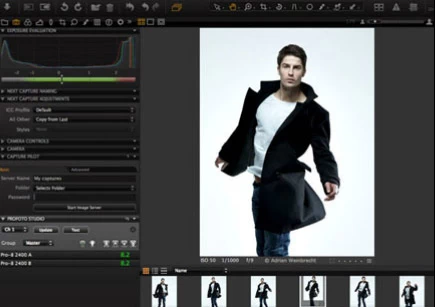 Have you bought a digital camera or do you shoot with a mobile phone, and are you looking for software for cataloguing and viewing photographs, converting them, global adjustments, local retouching or all possible and impossible effects? Today’s article won’t give you an unambiguous solution, the decision is always only yours, but I hope the following lines will help you find your bearings in the current offer of graphics programs.
As I have already hinted, graphics software can’t be thrown into one bag. Even the uncrowned king of graphics programs, the popular Adobe Photoshop, doesn’t solve everything and isn’t the best and most suitable for all your needs.
Before we get to a small overview by purpose, I’ll mention the division according to whether and how much you pay for photo programs. In principle there are three basic groups.
- Freeware – programs for which you pay nothing. An interesting subgroup is open-source programs – not strictly freeware; this is software whose source code is public and anyone can improve it and, observing the licence terms (mostly a GNU GPL type licence), spread their own mutation further. Among end users this type of software is very popular not only because it is usually free, but also because a large group of enthusiasts often works on new versions, which for the future often promises more than commercial producers offer us.
- Shareware – you can often use these programs for personal non-commercial needs. Sometimes they are free, which is paid for by limited functionality compared with their paid version, by advertising or in some other way. It is also common that the program is fully functional, yet the licence terms state that you may use it only after payment, and until then you are in fact using it illegally. Shareware prices are often symbolic.
- Commercial software – you simply pay for a licence of the program and can use it legally in accordance with the licence agreement. The amounts you pay for commercial software range from hundreds of crowns to tens of thousands depending on the particular program, its version and the type of licence. Producers often offer so-called trialware, a trial version for a shorter time, mostly 14 days or a month. After this period you have to buy the program, or it mostly stops working.
But let’s turn to the programs themselves. The first group I’ll mention is
Programs for viewing, archiving and cataloguing photographs
The era of digital photographs and scanned negatives or old photographs calls for sensible and working archiving with the possibility of quick viewing of shots. Current programs offer advanced searching by date taken, keywords, your personal rating or even by technical parameters, such as the aperture used, the lens used, sensitivity and so on. Most have a built-in photo editor, batch processing of multiple files is standard, and functions for direct and simple sharing on social networks or publishing in internet galleries like Picasa or Flickr appear more and more often. There you can mostly choose who all your photographs will be accessible to.
ACDSee
Probably the most popular photo viewer is the program ACDSee. Today it exists in two versions, the home ACDSee Photo Manager 12 and the functionally richer ACDSee Pro 4. Both versions are intended for MS Windows, and the Pro version can also be bought by users of Apple computers. ACDSee has been on the market for many years and still holds its standard. Besides quick and comfortable viewing of photographs it offers their conversion, simpler editing, personal rating, batch processing and the like, practically more than an ordinary user needs. It is commercial software whose price is not exorbitant, and especially the ACDSee Photo Manager 12 version, which is amply sufficient for most users, is something anyone can really afford. Trial versions are available and the producer often offers big discounts; for example, there is now a chance to buy both programs with a 60% summer discount. More at www.acdsee.com.
Adobe Lightroom
The producer of Photoshop, the company Adobe, is also fighting capably for its place in the sun, with the commercial program Lightroom, whose main function, however, is photo editing – we’ll mention that below. Lightroom’s cataloguing abilities are interesting, but I found it extremely unpleasant that the trial version of the program behaved as if it were the only program of its kind on my computer. After the first launch it offered to catalogue my photographs, which meant an offer to move or copy all my files into a new Lightroom folder. I chose another of the options; it performed neither of the described operations, yet the program wrestled for several hours with 94 thousand photographs stored on my disk and created thousands of folders and tens of thousands of its own new files in the Documents folder. They serve as the program’s database – I didn’t compare them, but I assume one file belongs to each photograph. I have tried the trial version several times over time and the program has so far – compared with the competition – never appealed to me. That doesn’t mean it is bad software, as a number of its fans attest. I am not among them, at least not yet. Lightroom exists in a version for MS Windows and Mac OS. We’ll return to it in the chapter on photo editing programs. More at www.adobe.com/cz/products/photoshoplightroom/.
Google Picasa
It wouldn’t be Google if it weren’t in everything, and the program Picasa from its workshop is a typical example of modern software. The program is free, simple and does what most camera owners need. I deliberately say „camera owners“ and not „photographers“, because Picasa seems to me more suitable for home use than for truly professional work, yet little can be held against it. Picasa has all the usual functions of a viewer and photo catalogue, a simple editor, built-in effects, the ability to create presentations etc. What sets it apart is its integration with Google services. Directly from the program you can create web albums in the Google Picasa service, decide whether they will be private or public and work with them further as with your documents, including linking with other Google services. Let’s get used to it; in time everything will be in the cloud (the internet cloud) and future generations won’t understand what we had hard disks at home for. As an author of photographs I will probably always try to keep my data, my negatives, nicely safe at home under the mattress, but this is how our future is set and all the important computer companies (besides Google, e.g. Microsoft or Apple) are already starting to let us know. I must admit they do it in an unobtrusive, inconspicuous and for users often interesting way. A few years ago I wondered how they would try to force us into it; today I see that the path the internet companies chose is increasingly regarded by ordinary users as an advantage, as something extra. Hats off, but let’s return to the topic. Download Google Picasa for free at picasa.google.com.
IrfanView
IrfanView is freeware for non-commercial use (for commercial use the Austrian author Irfan Skiljan requires a small fee of 10 EUR or 12 USD) and boasts being one of the most popular photo viewers. It’s true, IrfanView is fast, simple and offers a range of functions, including extension by plugins, but it never grew on me much, perhaps because of its graphical interface and various small things that bother me and seem uncomfortable. When I talk about its graphics, I mustn’t omit one thing – in the program’s logo a red cat is run over by a car 🙂 Download at www.irfanview.com.
XnView
Another viewer from an endless series, which (in the words of the IrfanView author) mostly copies ACDSee or IrfanView, is again the freeware XnView. This software is probably the one that most sticks in the craw of the IrfanView author for alleged theft and cloning. I don’t intend to judge where the truth lies; in any case XnView is here, it is again free and not uninteresting at all. It can display over 400 different image formats and can save over 50 of them. If nothing else, that is not little. XnView is definitely worth trying. Download at www.xnview.com.
Zoner Photo Studio
The last viewer I’ll mention is the Czech program Zoner Photo Studio, increasingly popular not only here but also in the world. It is no newcomer, the latest version bears the number 13 and has practically everything you require of such a program – speed, simplicity, powerful tools for managing photographs, a decent editor and options for sharing your creations. Zoner Photo Studio is not free, but its price (just under a thousand crowns) is more than reasonable considering what it offers and in what quality and comfort. If there is time and interest, I’ll return to this very interesting program from a domestic workshop in a separate article. Zoner Photo Studio definitely deserves attention. More at www.zoner.cz.
Another important group of programs is
RAW editors
Anyone who wants to get the maximum from a digital photograph shoots not in JPG format but in RAW. It is, exactly as translated, a raw format, enabling photo adjustments with minimal loss of quality. Various manufacturers use their own modifications, but in principle it is very similar. Nikon has its NEF, Canon CRW and CR2, Pentax PEF, Sony SR2 or ARW etc. Some time ago Adobe stepped into all this with an effort at unification and created the DNG format (digital negative), which will apparently become the universal format of the near future.
Editing photographs in RAW format gives us incredible possibilities compared with JPG or, say, TIF, but it is a matter of quality, speed, comfort, price and other factors, so it is important to choose the right editor.
Again we can mention Photoshop and most of the viewers described above. However powerful a tool Photoshop is, I don’t like opening RAW photographs in it. I’m not claiming it can’t or does it badly, but in my experience specialized programs do it better and more comfortably. The same holds for most viewers, which can often edit and convert a RAW photograph, but to me that seems more like a supplementary activity.
Adobe Lightroom
I have already written about it in the chapter devoted to viewers. This very popular software didn’t impress me much as a RAW editor either. At first glance it offers simple and effective photo adjustments, but it seems to me too preset and, in my view, it lacks the detailed fine-tuning of a shot that some competing products offer. If you want information, a trial or to buy, here is the link www.adobe.com/cz/products/photoshoplightroom/.
ACDsee
ACDSee in the Pro version already offers more advanced editing, but I still see the main strength of the program in being a viewer. www.acdsee.com.
Zoner Photo Studio
Zoner Photo Studio I intend to examine in more detail before I get to evaluating it as a RAW editor. www.zoner.cz.
Nikon Capture NX
A powerful editor specialized in the NEF format, that is Nikon’s RAW variant. This limitation excludes it from the category of universal editors. Generally one can say that, like the competition, it becomes a better and better tool with each new version. It can do both global and local adjustments. More at www.capturenx.com.
Capture One Pro
Capture One Pro 6 from Phase One has a long tradition of quality behind it. New versions are faster, can do global and local adjustments, and its conversion to black and white is fantastic. It is among the most expensive RAW editors, but the comfort of work and quality of results make up for the higher price. Nothing is perfect, but this is more or less how I imagine a proper editor. Try it – www.phaseone.com/en/Software/Capture-One-Pro-6/About/Pro-Overview.aspx.
DxO Optics Pro
DxO is in my opinion the biggest, though here not very well known, competitor of Capture One. Among its curiosities are automatic corrections for various lenses and cameras. You simply open a photograph and within a moment its geometry, colour, brightness, contrast, chromatic aberration etc. are adjusted automatically. Merely opening and re-saving a photograph usually means improving it. The program will also be appreciated by architecture photographers and all who often straighten verticals, tilting of photographs and variously distorted perspective; in this it offers tools I haven’t yet seen at the competition. You will surely also be interested in the option to set a photo as it would look shot on a specific film or even on another digital SLR. Trial version and information – www.dxo.com/us/photo/dxo_optics_pro/introduction.
Bibble Pro
Bibble Pro from Bibble Labs is also a very interesting and increasingly better RAW editor. Among its specialties is extensibility with various plugins. In the past I wasn’t satisfied with the quality of the output, but according to information there has been a marked improvement. More at bibblelabs.com.
Aperture
The most popular and very good program for the Apple platform (from Apple, so we will probably never see a Windows version) – www.apple.com/aperture.
Will Photoshop finally come?
Graphics editors
Yes, it can’t be avoided and there is no reason to. Let’s say you picked the best photograph in the viewer, brought it in the RAW editor as close as possible to your idea of perfection, but something is still missing or in excess. Something for which a strong universal editor with a wide range of tools and effects for global adjustments and effects or detailed retouching, painting in and painting out is really the most suitable. A tool that can work with layers, transparency, has various brushes and more and more aids. In that case we are talking about a graphics editor, and although there are other options, the whole world revolves practically around two names.
Adobe Photoshop
The first of them is Adobe Photoshop. It rightfully became the winner on the whole front and gradually trampled into the ground the competing Aldus Photostyler, Corel Painter, Paint Shop Pro and others, commercial and non-commercial. It is expensive (something under 30 thousand – by the way, in the USA it costs roughly half, unfortunately you can’t use an American licence here – a reason to support free software), but it is standardly universal and good. Its new versions are never surprising, because it doesn’t need to shock with cheap tricks. It simply does what it should and does it more than well. If someone wanted „almost Photoshop“, for roughly a tenth of the price they can buy the trimmed-down version Adobe Photoshop Elements.
GIMP
Although a number of producers try, Photoshop has perhaps only one competitor, and that is the open-source program GIMP (short for GNU Image Manipulation Program). It is distributed for free under the GNU licence and exists in versions for Windows, Linux/Unix and Mac OS. It has as many fans as opponents (paradoxically mostly users of pirated versions of Photoshop). The truth is that someone used to Photoshop has some trouble understanding the philosophy of GIMP’s controls, and it is still held against it that its support for CMYK colours was once non-existent and is today insufficient, and other things. But it is free and can do really a lot, like Photoshop much more than most users will ever be able to use. Simply, you will find few situations in which GIMP wouldn’t be enough for you. Support free software and download here – www.gimp.org.
Well, damn, I expected it to be markedly shorter and I of course still left out this and that. I’m not omniscient and occasionally I forget too. Have a nice day, everyone 😉